Track spending anywhere. Split bills with zero friction.
Nest — Spending Tracker
The modern, privacy-first personal finance app. No bank logins required, 100% offline capability, and conflict-free bill splitting with friends.
100% Local
Privacy
0 Required
Bank Logins
170+ Live
Currencies
Zero Lag
Offline Sync
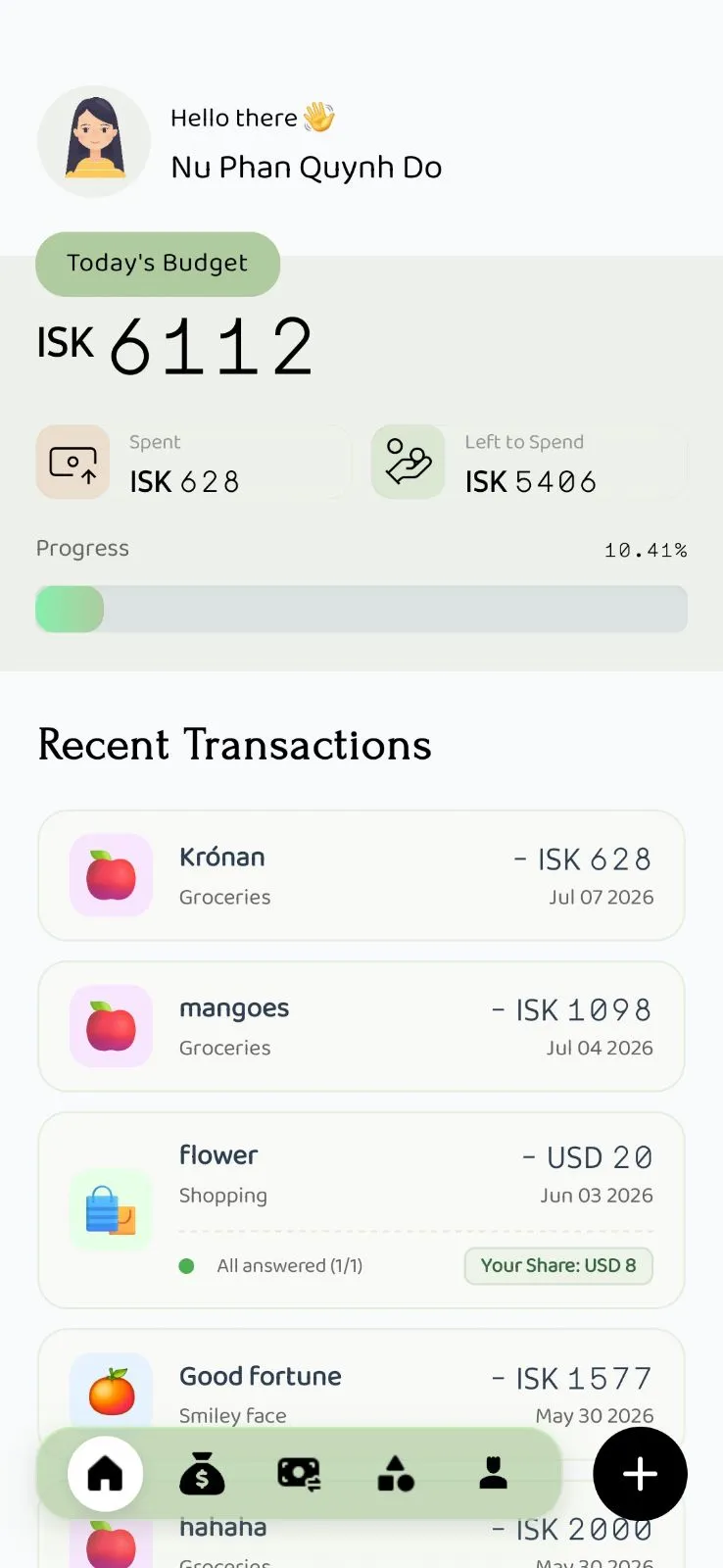
See How It Works In The Wild
Real life happens on planes, in crowded restaurants, and across borders. Test three everyday scenarios below:
Instant Multi-Currency, Zero Guesswork
Pay in Japanese Yen, Euros, or Pounds. Nest converts to your home currency automatically at live rates—even while riding subterranean trains with zero signal.
Transaction in Tokyo
¥1,850 JPY (Ramen Dinner)
Converted to Home Budget
$11.92 USD
Stored immediately to local disk · Live rate 1 USD = 155.20 JPY
Engineered for Daily Peace of Mind
Every interaction is tuned to eliminate friction, respect your privacy, and get out of your way.
Instant Log, Zero Latency
Track spending on subways, flights, or remote trips. The app opens instantly, stores data locally on your device, and syncs seamlessly when connected.
Conflict-Free Bill Splitting
Split dinner bills or trip expenses in seconds. Friends can propose direct counter-adjustments inside the app—accept with one tap, no awkward math.
Real-Time Multi-Currency Magic
Shop or travel across borders. Enter expenses in local currencies and Nest instantly converts them to your home budget using live rates.
Continuous Insights, No Blank Slate
When your monthly budget cycle resets, Nest keeps your recent spending insights active so you stay aware while setting new targets.
Effortless Historical Edits
Spotted a missed transaction from last month? Jump back, make edits, and watch your reports update in real-time with zero data corruption.
Bank-Grade Privacy & Encryption
Your financial life belongs to you. Zero bank credentials requested, zero data harvesting, and optional encrypted cloud backup.
Why People Are Switching
You shouldn’t have to trade your financial privacy or battle clunky software just to track what you spend.
Constant disconnects, Plaid data breaches, requires your bank login & passwords.
100% bank-free. Zero passwords given away. All data stays local and encrypted on your device.
Spinning loading wheels on subways, flights, or crowded restaurant Wi-Fi.
Opens in milliseconds. Instant offline entry anywhere on Earth, auto-syncing in the background.
Awkward spreadsheet calculations, passive-aggressive group texts, and forgotten Venmo requests.
One-tap in-app split adjustments. Friends counter-offer smoothly without awkward confrontation.
Manual currency conversion calculator apps and mental math errors.
Log in any foreign currency; Nest converts to your home budget automatically with live exchange rates.
Expensive $12–$15/month subscriptions and aggressive upsell popups.
Free offline-first core forever. Transparent, affordable optional cloud sync.
Engineered For How You Actually Live
Whether you’re backpacking through Southeast Asia, splitting rent with roommates, or just want your financial data private.
Travelers & Digital Nomads
Never convert currencies in your head again.
Record local street food in Tokyo, train tickets in Berlin, or hostels in Bangkok. Works 100% offline at 35,000 feet and auto-converts to your home budget.
✓ Live rates across 170+ global currencies
Couples, Friends & Roommates
Split shared expenses without the dinner table debate.
Propose split ratios or adjustments directly in-app. Everyone stays in sync without downloading clunky third-party calculators or arguing over forgotten receipts.
✓ One-tap counter-offers & settlement
Privacy & Security Purists
Your financial life belongs solely to you.
Tired of handing your bank username and password to data brokers? Nest requires zero bank links and stores your data encrypted locally on your device.
✓ Zero bank logins, zero analytics trackers
Pricing & Plans
Core features are 100% free and offline forever. Upgrade to Premium for real-time encrypted cloud sync and unlimited collaboration.
- Cloud Sync & BackupKeep your data secure and accessible across all your devices.
- FreeLocal-only storage
- ★ PremiumReal-time background cloud sync
- Friends LimitAdd friends to split meals, trips, or shared expenses.
- FreeUp to 2 friends
- ★ PremiumUnlimited friends
- Bill Split NegotiationsPropose splits and let friends counter-offer directly in the app.
- FreeLocal draft calculator only
- ★ PremiumLive sync & direct counter-offers
- Multi-Currency MagicSpend abroad and automatically convert split shares using live rates.
- FreeManual conversion helper
- ★ PremiumLive exchange rates & auto-converting splits
- Budget History & ArchiveLook back at past spending cycles to trace habits and edit errors.
- FreeActive cycle only
- ★ PremiumUnlimited past cycles with full edit access
- Always-On DashboardAvoid blank screens when transition periods end.
- FreeEmpty screen between cycles
- ★ PremiumFallback to last completed cycle insights
Start using Nest today
The modern, privacy-first personal finance app. No bank logins required, 100% offline capability, and conflict-free bill splitting with friends.
Questions
01Can I track budgets and log expenses completely offline?
Yes. Nest is a fully offline-first app. You can record transactions, split bills, and check budgets with zero signal. Everything syncs safely when you are back online.
02How does the offline split bill negotiation work without awkwardness?
If a friend wants to adjust their share, they can send a direct counter-offer in the app. Once you approve it with one tap, everyone's budget updates automatically without awkward math.
03Is Nest a good travel expense tracker for foreign currency conversions?
Yes. Enter your purchase in any foreign currency and Nest instantly converts it to your home currency using live exchange rates, keeping your budget accurate while traveling.
04Does Nest help transition budget periods without losing insights?
Yes. Instead of showing an empty screen at the end of a month, Nest keeps displaying insights from your last completed cycle to help you transition into your next spending goal seamlessly.
05Can I manually edit past transactions and historical budgets?
Yes. You have full access to your past history. You can look back at any previous period, fix transaction errors, and keep your records perfect.
Legal
Terms of Use
Nest Terms of Use
Last updated: August 9, 2026

Welcome to Nest ("Nest," the "App," "we," "us," or "our"). These Terms of Use ("Terms") govern your access to and use of the Nest application and related services.

By downloading, installing, accessing, or using Nest, you agree to these Terms. If you do not agree with these Terms, please do not use the App.

1. THE NEST SERVICE
Nest is a budgeting and expense-tracking application that allows you to record and organize financial information, manage budgets, perform calculations, and use other features provided by the App.

Nest is designed to be offline-first. Financial information may be stored locally on your device. Certain features, including cloud synchronization, may require an active subscription and your explicit choice to enable synchronization.

We may add, modify, or discontinue features from time to time.

2. YOUR DATA
You retain ownership of the financial and other information that you enter into Nest.

When cloud synchronization is enabled, the information you choose to synchronize is transmitted to and stored in our cloud infrastructure so that it can be synchronized across supported devices.

Our handling of your information is described in our Privacy Policy.

You are responsible for maintaining the security of your device and any account credentials or authentication methods used to access Nest.

3. SUBSCRIPTIONS
Certain Nest features may require a paid subscription.

Subscriptions are purchased through the applicable app store, such as the Apple App Store or Google Play. Subscription prices, billing periods, introductory offers, and other applicable terms are displayed at the time of purchase.

Unless otherwise stated at the time of purchase, subscriptions may automatically renew at the end of each subscription period unless canceled in accordance with the applicable app store's procedures.

Your subscription is billed through the applicable app store account. Nest does not directly process your payment card or other payment method for purchases made through the App Store or Google Play.

You can manage or cancel your subscription through the applicable app store. Cancellation generally prevents future renewal but does not necessarily provide a refund for the current subscription period. Refunds are subject to the policies of the applicable app store.

4. CLOUD SYNCHRONIZATION
Cloud synchronization is an optional feature.

If you have an eligible subscription and choose to enable cloud synchronization, your selected financial and budgeting data may be stored in our cloud infrastructure and synchronized between supported devices. Cloud synchronization may not be available without an active subscription.

If you disable synchronization or use Nest without cloud synchronization, your financial data may remain stored only on your device.

We cannot guarantee that synchronization will always be uninterrupted or that data will never be affected by technical failures. You should maintain appropriate backups of information that is important to you.

5. ACCEPTABLE USE
You agree to use Nest only for lawful purposes and in accordance with these Terms.

You must not:
- Reverse engineer, decompile, disassemble, or attempt to derive the source code of the App, except where such activity is expressly permitted by applicable law.
- Attempt to circumvent subscription restrictions or other access controls.
- Interfere with or disrupt Nest's servers, APIs, synchronization systems, or other infrastructure.
- Use the App to engage in unlawful, fraudulent, or abusive activities.
- Attempt to gain unauthorized access to another user's account or data.
- Use automated methods to access or interact with Nest in a manner that could damage or impair the service.

6. ACCOUNT TERMINATION AND DATA DELETION
You may delete your Nest account through the functionality provided in the App.

When an account is deleted, the associated profile is deactivated. Cloud-synchronized information associated with the account is scheduled for permanent removal from our Firebase database 90 days after account deletion.

You may request earlier deletion of your cloud-synchronized information by contacting us.

Deletion of your account may result in the loss of access to cloud-synchronized information and other account-related features.

Subscription cancellation is separate from account deletion and may need to be managed through the applicable app store.

7. INTELLECTUAL PROPERTY
Nest, including its software, design, branding, text, graphics, and other materials provided by us, is owned by or licensed to us and is protected by applicable intellectual property laws.

Except as expressly permitted by these Terms or applicable law, you may not copy, modify, distribute, sell, lease, or otherwise exploit the App or its content.

8. DISCLAIMER OF WARRANTIES
Nest is provided on an "as is" and "as available" basis to the extent permitted by applicable law.

We do not guarantee that Nest will always be available, uninterrupted, error-free, or completely secure.

Nest is a budgeting and expense-tracking tool. It does not provide financial, investment, tax, accounting, legal, or other professional advice. You are responsible for reviewing the information you enter into the App and for making your own financial decisions.

9. LIMITATION OF LIABILITY
To the maximum extent permitted by applicable law, we will not be liable for indirect, incidental, special, consequential, or punitive damages, or for loss of data, profits, or business resulting from your use of or inability to use Nest.

Nothing in these Terms limits or excludes any liability that cannot legally be limited or excluded under applicable law.

10. CHANGES TO THESE TERMS
We may update these Terms from time to time to reflect changes to Nest, our services, or applicable legal requirements.

When we make changes, we will update the "Last updated" date above. Where required by applicable law, we will provide additional notice of material changes.

Your continued use of Nest after updated Terms become effective constitutes acceptance of the updated Terms, to the extent permitted by applicable law.

11. GOVERNING LAW
These Terms are governed by the laws applicable to us and our place of establishment, except to the extent that mandatory consumer protection laws in your country or region provide otherwise.

Nothing in these Terms is intended to limit rights that you may have under mandatory consumer protection laws.

12. CONTACT US
If you have questions about these Terms, your account, subscriptions, or deletion of your data, please contact us at: nest-contact@bynight.studio
Privacy Policy
Privacy Policy for Nest
Last updated: August 9, 2026

Nest ("Nest," "we," "us," or "our") is a privacy-first budgeting and expense-tracking application available on Android and iOS.

This Privacy Policy explains what information Nest collects, how that information is used, where it is stored, and the choices you have regarding your information.

1. INFORMATION WE COLLECT

Financial and Budget Data
Nest allows you to enter and manage financial information such as transactions, budgets, accounts, and related budgeting information. By default, this information is stored locally on your device. If you enable cloud synchronization, the budget and financial data you choose to synchronize is stored in our cloud infrastructure so that it can be synchronized across your devices. We do not sell your financial or budget data.

Generated User ID
When cloud synchronization is enabled, Nest uses a randomly generated user ID to associate your synchronized data with your Nest profile. This user ID is not your name or email address. Nest does not require you to provide an email address or name to use this generated identifier for cloud synchronization.

Analytics Information
Nest uses Amplitude to collect anonymous analytics events to help us understand how the application is used and improve its functionality, performance, and stability. These analytics events are not intended to contain your financial transactions, budgets, or other financial information.

Subscription and Purchase Information
Nest uses RevenueCat to manage subscriptions and synchronize subscription status and purchase information. Subscription and purchase information may be processed by RevenueCat and the relevant app store, including Apple App Store and Google Play, as necessary to provide subscription functionality.

Nest does not use your financial budgeting data for advertising or sell it to third parties.

2. HOW WE USE INFORMATION
We use information collected through Nest to:
- Provide budgeting, expense tracking, and split-bill features.
- Store and synchronize your data when cloud synchronization is enabled.
- Maintain and manage subscriptions.
- Synchronize subscription status across supported devices.
- Understand anonymous application usage and improve the application's functionality, performance, and stability.
- Detect, investigate, and resolve technical problems.

We do not sell your personal information or financial data.

3. CLOUD SYNCHRONIZATION
Cloud synchronization is optional. If you enable cloud synchronization, your synchronized budget and financial data is stored in Firebase cloud infrastructure and associated with your randomly generated Nest user ID. Cloud synchronization allows your data to be available across supported devices associated with your Nest profile.

If cloud synchronization is not enabled, your budget and financial data remains stored locally on your device, subject to the storage and security mechanisms of your device and operating system.

4. THIRD-PARTY SERVICES
Nest uses third-party service providers to operate certain features of the application.

Firebase
We use Firebase to provide cloud storage and synchronization. When cloud synchronization is enabled, Firebase stores your generated Nest user ID and the budget and financial data that you have chosen to synchronize.

Amplitude
We use Amplitude for anonymous application analytics. Amplitude receives analytics events that help us understand application usage and improve Nest. We do not intentionally send your financial transactions, budgets, or other financial data to Amplitude.

RevenueCat
We use RevenueCat to manage subscriptions and subscription status. RevenueCat processes information associated with purchases and subscriptions to allow Nest to provide subscription functionality and keep subscription status synchronized.

These third-party services may process information according to their own privacy policies and terms.

5. DATA RETENTION AND DELETION
Your locally stored data remains on your device until you delete it or it is otherwise removed through your device or the Nest application.

When you delete your Nest account, your profile is deactivated. Information associated with the deactivated profile is scheduled for removal from our Firebase database 90 days after account deletion.

You may request earlier deletion of your cloud-synchronized information by contacting us using the contact information provided below. We will process such requests in accordance with applicable law and our ability to verify and fulfill the request.

Deleting your Nest account may also affect your ability to access subscription-related features. Subscription cancellation may need to be managed separately through the relevant app store account.

6. DATA SECURITY
We take reasonable measures to protect information stored and processed through Nest. Locally stored data is protected using the security mechanisms provided by your device and operating system. Cloud-synchronized data is stored using Firebase infrastructure and associated with a randomly generated user ID.

However, no method of electronic storage or transmission over the internet can be guaranteed to be completely secure.

7. DATA SHARING
We do not sell your personal information or financial data. We share or allow access to information only as reasonably necessary to provide Nest's functionality, including with:
- Firebase, for cloud storage and synchronization.
- Amplitude, for anonymous analytics.
- RevenueCat, for subscription management and purchase synchronization.
- Apple and Google, as necessary to process and manage purchases made through their respective app stores.

We may also disclose information where required by law, legal process, or to protect the rights, safety, and security of Nest, our users, or others.

8. CHILDREN'S PRIVACY
Nest is not intended to knowingly collect personal information from children in violation of applicable law. If you believe that a child has provided information to us in a manner that violates applicable law, please contact us so that we can investigate and take appropriate action.

9. YOUR CHOICES
You can choose whether to enable cloud synchronization. You can also delete your Nest account and request earlier deletion of your cloud-synchronized information by contacting us. You may manage subscriptions and purchases through the relevant app store account.

10. CHANGES TO THIS PRIVACY POLICY
We may update this Privacy Policy from time to time to reflect changes to Nest, our services, or applicable legal requirements. When we make changes, we will update the "Last updated" date at the top of this Privacy Policy.

11. CONTACT US
If you have questions about this Privacy Policy, your data, or a request for earlier deletion of your information, please contact us at: nest-contact@bynight.studio
Support & Data Deletion
Have a question, feedback, or need to permanently delete your account and all associated data? Send an email to nest-contact@bynight.studio. All data deletion requests are permanently fulfilled within 7 business days.